Coloring Book Publishing Checklist: 15 Must-Have Items
Coloring Book Publishing Checklist: 15 Must-Have Items
Publishing a coloring book on Amazon KDP can feel overwhelming, but following a step-by-step process makes it manageable. This guide breaks down the 15 essential steps you need to create a professional-quality coloring book that meets Amazon's technical standards and appeals to buyers. Here's what you'll learn:
- Niche Research: Identify profitable themes using Amazon search trends and Best Sellers Rank (BSR).
- Book Specifications: Choose trim size (e.g., 8.5" × 11"), page count, and paper type.
- Artwork Creation: Ensure illustrations are sharp, 300 DPI, and meet KDP guidelines.
- File Preparation: Set proper margins, bleed, and export files as high-resolution PDFs.
- Publishing on KDP: Upload files, set pricing, and optimize metadata for visibility.
- Marketing: Use Amazon ads, social media, and free samples to promote your book.
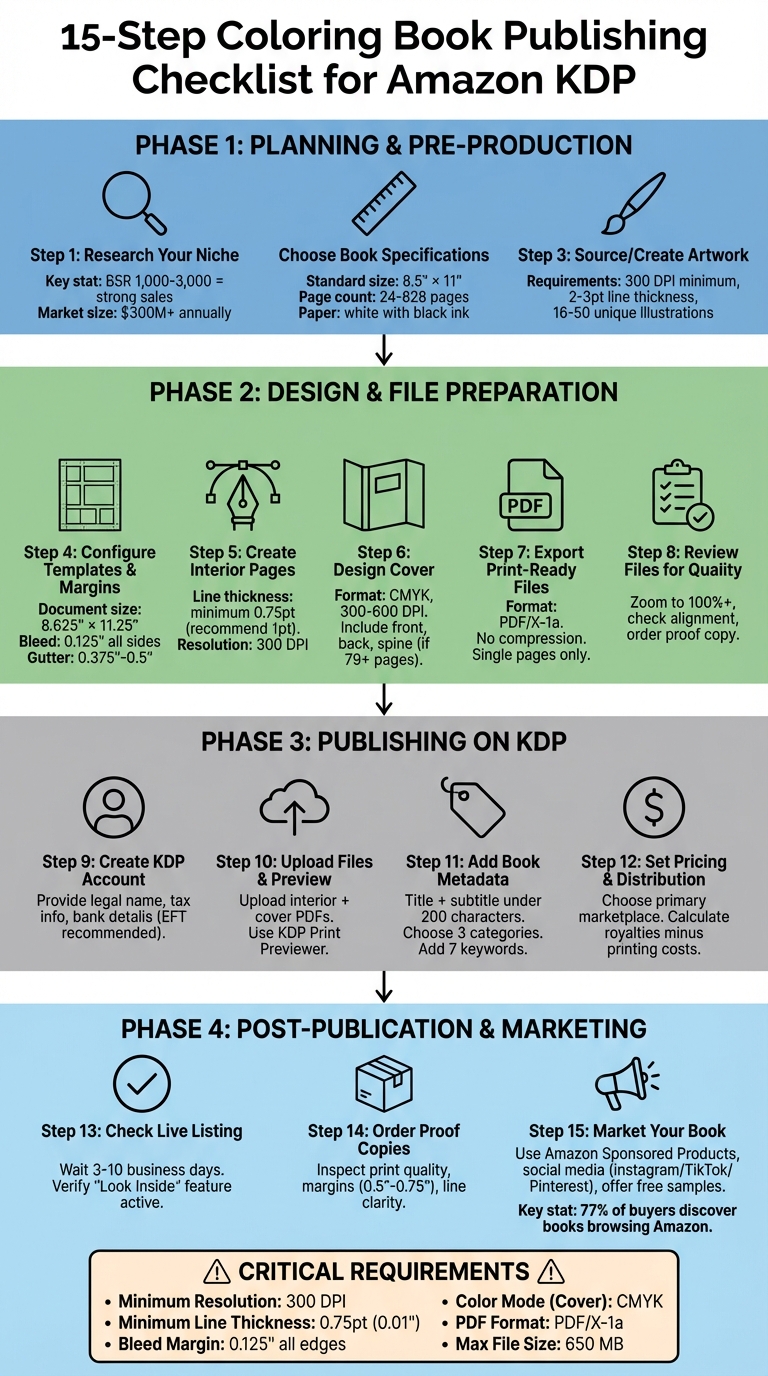
15-Step Amazon KDP Coloring Book Publishing Checklist
Planning and Pre-Production
Research Your Niche and Audience
Start by exploring Amazon with keywords like "adult coloring book" or "kids coloring book." Pay attention to the auto-suggested terms, as they can reveal popular search trends. Check the Best Sellers Rank (BSR) of the top 10 results for each keyword. A consistent BSR between 1,000 and 3,000 usually signals strong sales potential. For context, the adult coloring book market alone generates over $300 million annually on Amazon, with successful titles selling 50 to 200 copies monthly . Some top-performing books even bring in monthly royalties ranging from $5,000 to $15,000.
Don’t stop there - browse the "Customers who bought this also bought" section on top-selling books. This can help you spot related themes and potential cross-promotional opportunities. For kids' books, focus on simple, bold illustrations paired with educational text. For adults, intricate patterns and themes centered around mindfulness and stress relief are key. As Jason Hamilton, Author and Former Content Manager at Kindlepreneur, emphasizes:
The quality of the art is a HUGE factor in whether the coloring book continues to sell over time.
Once you’ve identified your niche and audience preferences, you can begin defining your book's specifications.
Choose Book Specifications
Your audience research will guide you in selecting the right book specifications. The 8.5" × 11" trim size is the go-to standard for both adult and children's coloring books. It offers ample space for illustrations while keeping printing costs manageable . If you’re creating square mandala designs, the 8.5" × 8.5" size is another great option. Keep in mind that Amazon KDP requires a minimum of 24 pages for paperbacks, with a maximum of around 828–830 pages .
Most successful coloring books feature between 16 and 50 unique illustrations. To prevent marker bleed-through, print illustrations on one side of the page only. For example, a book with 20 illustrations would result in a 40-page count. Use white paper with black ink to meet KDP standards for coloring books.
Source or Create Artwork
High-quality artwork is essential. All illustrations should be at least 300 DPI to ensure crisp, clear lines with no pixelation . Stick to 2–3pt line thickness and use high-contrast settings for optimal results. Whether your art is hand-drawn, commissioned, or AI-generated, make sure you own the rights to the content. Avoid using trademarked or copyrighted characters .
If you’re using AI tools, Amazon KDP requires you to disclose whether the content is "AI-generated." However, if the core work is human-created and AI was only used for refining or editing, disclosure isn't necessary. When generating artwork through AI, use specific prompts like "black and white line art", "high contrast", "no shading", and "clean single-pixel vector-like strokes" to get usable results. Always examine the artwork at full scale to catch any pixelation or line inconsistencies.
These steps will set a solid foundation for the design and file preparation stages.
Design and File Preparation
Configure Templates and Margins
Set your document size to 8.625″ × 11.25″, which includes a bleed of 0.125″ on all sides. This extra space ensures there are no white borders if trimming isn’t perfectly aligned. For gutter margins, use 0.375″ for books with 24–150 pages and 0.5″ for those with 151–300 pages. Outside margins should be at least 0.375″, and keep any important artwork or text at least 0.5″ away from the trim edges.
Once your templates and margins are configured, you’re ready to focus on creating clean, high-quality interior pages.
Create Interior Pages with Clean Line Work
The clarity of your line work plays a huge role in creating a satisfying coloring experience. Make sure all lines are at least 0.75 point thick (approximately 0.01″ or 0.3 mm) to avoid fading or disappearing during printing. For even better results, many experts recommend using a 1 pt line weight. Mike Heaton from Ex Why Zed emphasizes:
"Line quality is the foundation of a great colouring book. Thin lines may fade or disappear when printed, so make sure all outlines are at least 1 pt thick."
Maintain a resolution of 300 DPI for all designs. If you’re working with vector files like SVG, AI, or EPS, your images will scale without losing quality. For raster formats like PNG or JPG, export at the highest resolution possible to avoid pixelation.
Design a High-Quality Cover
Your book cover should be a single PDF that includes the front, back, and spine. Design it in CMYK color mode at a resolution of at least 300 DPI (600 DPI is even better for sharper results). This ensures accurate color reproduction during printing.
If your book has at least 79 pages, you can include spine text. Keep the spine text at least 0.0625″ (1.6 mm) away from the edges. Be sure to remove any spot colors, Pantone references, or embedded color profiles before uploading, as these can cause unexpected color shifts when printed.
Export Print-Ready Files
Export your interior and cover designs as high-resolution PDFs. KDP recommends using the PDF/X-1a format for consistent and reliable printing. Turn off any downsampling or compression settings to preserve the original 300 DPI resolution.
Ensure that your PDFs are formatted as single pages, not two-page spreads. Remove any crop marks, trim marks, color bars, or registration marks, as these elements can interfere with KDP’s printing process. Fully embed all fonts (avoid font subsets), and double-check that the title, author name, and ISBN on your cover match the details you’ve entered in KDP’s "Book Details" section.
Once your files are exported, take the time to carefully review them for any issues.
Review Files for Quality
After exporting, perform a thorough quality check to ensure your files meet KDP’s standards. Open your PDFs and zoom in to 100% or higher to inspect each page. Look for issues like pixelation, broken lines, or text positioned too close to trim edges. Confirm that pages are in the correct order, with even-numbered pages on the left and odd-numbered pages on the right.
When you upload your files to KDP, use their online previewer to identify any formatting problems. It’s also a good idea to order a physical proof copy before making your book available for sale. A proof copy allows you to evaluate print quality, paper texture, color accuracy, and binding alignment - ensuring your book looks polished and professional.
| Element | KDP Requirement |
|---|---|
| Minimum Resolution | 300 DPI |
| Minimum Line Thickness | 0.75 point or 0.01″ |
| Bleed Margin | 0.125″ on all edges |
| Maximum File Size | 650 MB |
| Color Mode (Cover) | CMYK |
| Preferred PDF Format | PDF/X-1a |
Publishing on KDP
Create Your KDP Account
Head over to kdp.amazon.com and sign in using your Amazon account. Don’t have one? No problem - just create a new account. If you already have an Amazon account, it makes ordering proof copies faster. When setting up your KDP account, you’ll need to provide your legal name (not your pen name), your business type, and a valid mailing address. These details are essential for tax reporting and royalty payments. As KDP Jumpstart explains:
"Don't enter your pen name in your account details. We issue your payments and tax forms under the name listed in your account details."
Next, add your payment information by linking your bank account. Opting for Electronic Funds Transfer (EFT) is the quickest way to receive payments in your local currency without any thresholds. Complete the required tax interview by providing your taxpayer identification number. This step ensures Amazon complies with U.S. tax laws. If you're publishing from outside the U.S., having a Tax Identification Number (TIN) can help you qualify for tax treaty benefits, potentially lowering withholding rates.
Upload Files and Preview Your Book
To start, click on "Create" and select "Paperback." Fill in the book details, then go to the "Paperback Content" section. Begin by uploading your interior PDF - make sure it’s formatted as single pages, not as two-page spreads. Once the interior file is processed, upload your cover PDF. This step enables KDP to calculate the correct spine width for your book.
After uploading, use the KDP Print Previewer to carefully review your files. Pay attention to any warning triangles, which flag issues like low-resolution images or placeholder content. While low DPI warnings won’t stop your book from being published, placeholder text or images will. Zoom in to check details like line thickness, margins, and page alignment to ensure everything looks polished [5,25].
Once your files are validated, you’re ready to move on to adding metadata for your book.
Add Book Metadata
Your book title needs to match exactly what’s on your cover - no extra keywords like "notebook" or promotional phrases such as "bestselling." Keep your title and subtitle combined under 200 characters. Write a clear and concise pitch for potential buyers, but avoid including URLs, customer reviews, or time-sensitive information.
Choose up to three categories that best describe your book’s theme. For keywords, stick to two- or three-word phrases that readers are likely to search for. Avoid referencing other authors or using misleading terms. If your book is aimed at children, set the Reading Age to ensure it appears in age-specific search results and children’s categories.
Set Pricing and Distribution
Decide on your primary marketplace - this is where you expect to make the most sales and will determine your base list price. KDP calculates royalties by subtracting printing costs from your list price. Check pricing across Amazon’s various marketplaces to make sure your profit margins are where you want them.
sbb-itb-c02bfb4
Post-Publication Steps and Marketing
Check Live Listing and Order Proof Copies
Once you've submitted your book, it usually takes 3 to 10 business days to go live on Amazon. Keep an eye on your KDP Bookshelf - when the status updates to "Live", your book is officially available for purchase. Double-check your Amazon detail page to ensure everything matches your submission: title, subtitle, author name, and description. Also, confirm that the "Look Inside" feature is active so potential buyers can preview the quality of your line art.
While digital previews are helpful, they can miss some details. Ordering a proof copy is essential to evaluate the print quality. Look for crisp lines, proper margins (between 0.5″ and 0.75″), and ensure that coloring pages are printed on the right-hand pages with blank backs to prevent bleed-through. Carefully inspect the physical proof for any pixelation or alignment issues. If you spot problems, update your files immediately to maintain high-quality standards. This final step is crucial to delivering a polished product.
Once your book is live and thoroughly reviewed, it's time to focus on making it visible to your audience.
Market Your Coloring Book
Start by using Amazon Sponsored Products to promote your book. Set a fixed daily budget and target specific keywords like "mandala coloring book for adults" or "stress relief coloring." Use all seven keyword slots in your KDP dashboard, filling them with precise phrases instead of broad terms.
In addition to paid ads, leverage visual platforms to drive traffic. Post time-lapse coloring videos on Instagram Reels, TikTok, and Pinterest to highlight your artwork. Offering free downloadable sample pages is another great way to engage potential customers and collect email sign-ups. If your book is enrolled in KDP Select, take advantage of promotional tools like the Free Book Promotion or Kindle Countdown Deals to boost both visibility and rankings. Collaborating with niche influencers can also be effective - think parent bloggers for children's books or wellness content creators for adult stress-relief themes.
Create an Author Central account to build a professional author page that includes your bio and photo. This helps establish trust and makes it easier for readers to find your other titles. Enhance your Amazon listing with A+ Content, such as high-quality images of your book's interior pages. Including "before and after" examples of colored pages can be especially persuasive for browsers deciding whether to purchase.
Marketing is all about standing out, and the right strategy can make a big impact. With 77% of book buyers discovering new titles while browsing Amazon and 57% shopping without a specific book in mind, strong visuals and well-targeted ads can help your book capture attention.
Uploading your coloring book to Amazon KDP Tutorial
Final Checklist Summary
Creating a successful KDP coloring book involves following a clear, step-by-step process. From identifying a profitable niche to preparing your files and reviewing a physical proof, each stage plays a role in delivering a polished product.
Some critical aspects to keep in mind include ensuring your artwork is at 300 DPI and that margins meet KDP's specifications. These technical details are essential to avoid file rejections during the upload process. As Jason Hamilton emphasizes:
The quality of the art is a HUGE factor in whether the coloring book continues to sell over time.
Once your files meet the required standards, it’s time to check the printed version. Ordering a physical proof allows you to spot any printing issues that might not show up in digital previews. This final step ensures a professional product, safeguards your reputation, and helps prevent negative feedback.
FAQs
How can I ensure the artwork in my coloring book is high quality for publishing?
To create top-tier artwork for your coloring book, start with clean, precise line art. Make sure your strokes are consistent, avoid any stray marks, and design illustrations that are easy and enjoyable to color. When exporting your files, use a lossless format like PNG or TIFF, and ensure the resolution is at least 300 dpi to keep the artwork sharp and clear for printing.
Take time to review your artwork by increasing the contrast to confirm the lines are dark and clear. Check that the line thickness is consistent - typically between 0.2–0.5 mm for adult coloring books, with slightly thicker lines for children's books. Pay attention to details like avoiding gaps or overlapping elements. Also, review Amazon KDP's bleed, margin, and trim guidelines carefully to ensure no important parts of your design are cut off during the printing process. Running a test print can help you spot any alignment or scaling issues before finalizing.
Lastly, maintain a consistent style throughout the book by using uniform line weights, shading, and detail levels. A cohesive design across all pages not only looks professional but also makes your coloring book more appealing to buyers.
What are the best ways to market my coloring book on Amazon KDP?
To effectively market your coloring book on Amazon KDP, start by establishing a strong foundation. Create a complete Author Page through Amazon Author Central and link it to your KDP account. This makes it easier for potential readers to discover all your books in one place. To increase visibility, take advantage of Amazon Ads. Start with Sponsored Products to highlight individual books, and if you have several titles, consider using Sponsored Brands to showcase them as a collection. Use targeted keywords like "adult mandala coloring book" or "kids nature coloring pages" and regularly track your ad performance to fine-tune your campaigns.
In addition to ads, make sure your book’s metadata is optimized. Incorporate popular keywords into the title, subtitle, and description to improve searchability. Design a cover that grabs attention, even at thumbnail size, as this is often the first thing shoppers notice. Offering a launch discount (e.g., pricing your book at $4.99 instead of $9.99) can help drive initial sales and reviews. Inside your book, include a polite request for readers to leave a review - this helps build trust and credibility.
Don't stop with Amazon. Expand your reach by promoting your book on social media platforms like Instagram, Pinterest, and Facebook groups. Share sneak peeks of your coloring pages to engage potential buyers. You can also run limited-time giveaways to attract a broader audience. Combining these strategies will help increase your book’s visibility and set the stage for stronger sales.
What technical requirements should I follow to upload a coloring book to Amazon KDP?
To upload your coloring book to Amazon KDP without a hitch, ensure your files align with these technical specifications:
- Interior file: Provide a single-page PDF with images set at 300 dpi in grayscale or black-and-white. The file size should match your selected trim size (e.g., 8.5 × 11 inches). For artwork that reaches the page edges, include a 0.125-inch bleed. If not, keep a 0.25-inch margin inside the trim line.
- Page count: Your book must have between 24 and 828 pages for paperback, and the pages should be numbered sequentially.
- Cover file: Upload your cover as a separate PDF (or high-resolution JPG/PNG) at 300 dpi in CMYK color mode. Be sure to account for the spine width and add a 0.125-inch bleed around the edges.
Following these guidelines will help you sidestep common upload problems and get your coloring book ready for publication on KDP.