AI Tools vs Manual File Organization: Pros and Cons
AI Tools vs Manual File Organization: Pros and Cons
Struggling to manage your files efficiently? Whether you're sorting hundreds of coloring book designs or keeping track of drafts, the choice between AI tools and manual file organization can make or break your workflow. Here's the bottom line:
- Manual methods give you full control but are time-consuming and prone to errors. Sorting 500 files manually can take up to 3 hours, with human error rates as high as 30%.
- AI tools offer speed and precision, sorting the same files in seconds with 99.9% accuracy. However, they can be costly and may raise privacy concerns for sensitive files.
Key Takeaways:
- Time Savings: AI saves up to 12.5 hours per week compared to manual methods.
- Costs: AI tools range from $200–$500/year, while manual methods cost $5,000–$7,500 annually in lost productivity.
- Scalability: AI handles millions of files; manual systems struggle beyond 5,000.
- Control: Manual systems allow total customization, while AI automates decisions but requires trust in automation.
Quick Tip: If it takes you more than 30 seconds to find a file, it’s time to rethink your system. For high-volume tasks, AI tools like Coloring Book Engine combine speed with local processing to protect your data and keep costs predictable. For smaller projects, manual systems might still work, but be aware of the hidden time costs.
Let’s dive deeper into the pros and cons of each approach.
AI Tools for File Organization: Pros and Cons
Benefits of AI-Powered File Organization
Imagine sorting through 500 files in a single second instead of spending three hours manually - this is the kind of efficiency AI brings to the table. For creators managing extensive libraries, like those filled with coloring book designs, this time-saving feature is a game-changer.
One standout advantage is AI's ability to understand content. With tools like object detection and OCR (Optical Character Recognition), AI can analyze a file's contents and categorize images based on elements, such as a "cute elephant" or a "mandala pattern". This allows users to search archives using natural language commands like, "Show me floral patterns from last month", instead of tediously navigating folder after folder.
"AI file organization goes deeper. It actually reads the content... It's not organizing based on what you told it about the file - it's organizing based on what the file actually is."
The time savings are substantial. AI can save up to 12.5 hours per week and achieve organizational accuracy rates as high as 99.9% within just a few weeks of learning. Compare that to manual methods, where error rates can range from 18% to 40%.
AI also standardizes file naming by enforcing consistent formats, like ISO 8601 date structures and descriptive tags. It even groups related files by analyzing metadata, simplifying batch tasks and making large-scale organization much smoother.
While these benefits are impressive, they don't come without challenges.
Drawbacks of AI Tools
Even with all its advantages, AI tools have their limitations - and they can be costly. Many cloud-based services operate on a per-file credit system, which can quickly become expensive for creators producing hundreds of coloring pages every month.
Privacy is another major issue. Cloud-based AI tools often require uploading files to third-party servers, which can be problematic for creators handling proprietary designs. This process exposes sensitive artwork to potential risks, such as intellectual property theft or breaches of client confidentiality.
Accuracy is another factor to consider. While AI systems typically start at around 95% accuracy, they need a learning period to reach optimal performance. Even then, errors can occur. For instance, an AI might correctly categorize a file but fail to generate accurate filenames due to metadata issues.
Over-reliance on automation is also a concern. Without proper validation processes, errors can spread across an entire archive, turning a seemingly well-organized system into a chaotic one.
These challenges highlight the need for solutions that balance AI’s efficiency with reliability and control.
How Coloring Book Engine Solves AI Drawbacks

Coloring Book Engine (CBE) tackles these challenges head-on with a tailored approach. Instead of locking users into expensive subscription models, CBE offers a BYOK (Bring Your Own Key) system. By allowing users to connect their own OpenAI or Gemini API keys, it provides complete control over costs. You pay only what the AI provider charges - no hidden fees or markups.
Another standout feature is local GPU processing. With support for CUDA or Vulkan, CBE lets creators process high-resolution coloring book images directly on their own machines. This means your artwork stays on your computer, eliminating privacy risks while maintaining fast processing speeds.
The benefits don’t stop there. With CBE, costs and performance are predictable. Unlike cloud platforms that charge per file, CBE’s local AI model allows unlimited file organization without additional fees. Plus, offline functionality ensures that you’re not dependent on an internet connection. For professionals creating commercial-quality coloring books, this means you can batch-process thousands of files without worrying about unexpected expenses or data exposure.
CBE bridges the gap between the speed and efficiency of AI tools and the control and privacy of manual methods. It’s a solution designed for creators who prioritize ownership of their workflows, tools, and profits.
Manual File Organization: Pros and Cons
Benefits of Manual File Organization
Unlike AI-powered systems that automatically sort your files, manual file organization puts you in the driver’s seat, giving you full control over how everything is structured.
With manual organization, you can create a folder system that matches your specific workflow. For example, you might group files into categories like "Character Illustrations", "Scene Illustrations", or "Textures & Backgrounds" instead of relying on an algorithm’s interpretation. This hands-on approach is especially useful when managing hundreds of coloring book pages, each at a different stage of completion.
Another big plus? It’s completely free. You’re simply using the tools already available on your computer - folders, tags, and local storage - without having to pay for subscriptions that can cost anywhere from $200 to $500 annually. That’s a significant savings, especially for small businesses or independent creators.
Manual systems also keep your files local, meaning you retain full control over your data. This approach lets you implement granular version control by creating separate folders for different drafts or by adding version markers like "_v01" or "_raw" to filenames. This makes it easy to backtrack if a client decides to change direction at the last minute.
"File management for graphic designers isn't just admin work - it's an essential part of a productive, stress-free creative workflow."
A carefully planned manual system also makes collaboration easier. When working with editors or illustrators, a clear folder hierarchy ensures everyone can quickly find what they need without unnecessary confusion.
That said, manual organization does come with its own set of challenges.
Drawbacks of Manual Methods
Organizing files manually can be time-consuming. Sorting 500 files manually might take around 3 hours, whereas AI tools can do it in a matter of seconds. For coloring book creators producing dozens of pages every week, this could mean spending 20 to 30 minutes daily just managing files - time that could be better spent on actual design work.
Another common issue is inconsistent file naming, especially when deadlines are looming. This often results in vague or repetitive filenames, making it nearly impossible to locate specific files later without opening each one. Many designers fall into the dreaded "final-final" naming trap (e.g., "final-v2-FINAL-edit.ai"), which can lead to sending the wrong version to a client or accidentally overwriting important progress.
As your file library grows, manual systems can become overwhelming. Once you surpass 5,000 files, even the most well-thought-out folder structure can start to feel chaotic. Unused files, duplicates, and random downloads pile up, slowing down your device and making it harder to find what you need.
These inefficiencies add up. In fact, 57% of U.S. office workers cite "quickly finding files" as one of their top workplace frustrations. For many, the struggle is real - and costly in terms of both time and productivity.
AI-Powered Local File Organizer with Local and Private LLMs
sbb-itb-c02bfb4
AI Tools vs Manual Methods: A Direct Comparison
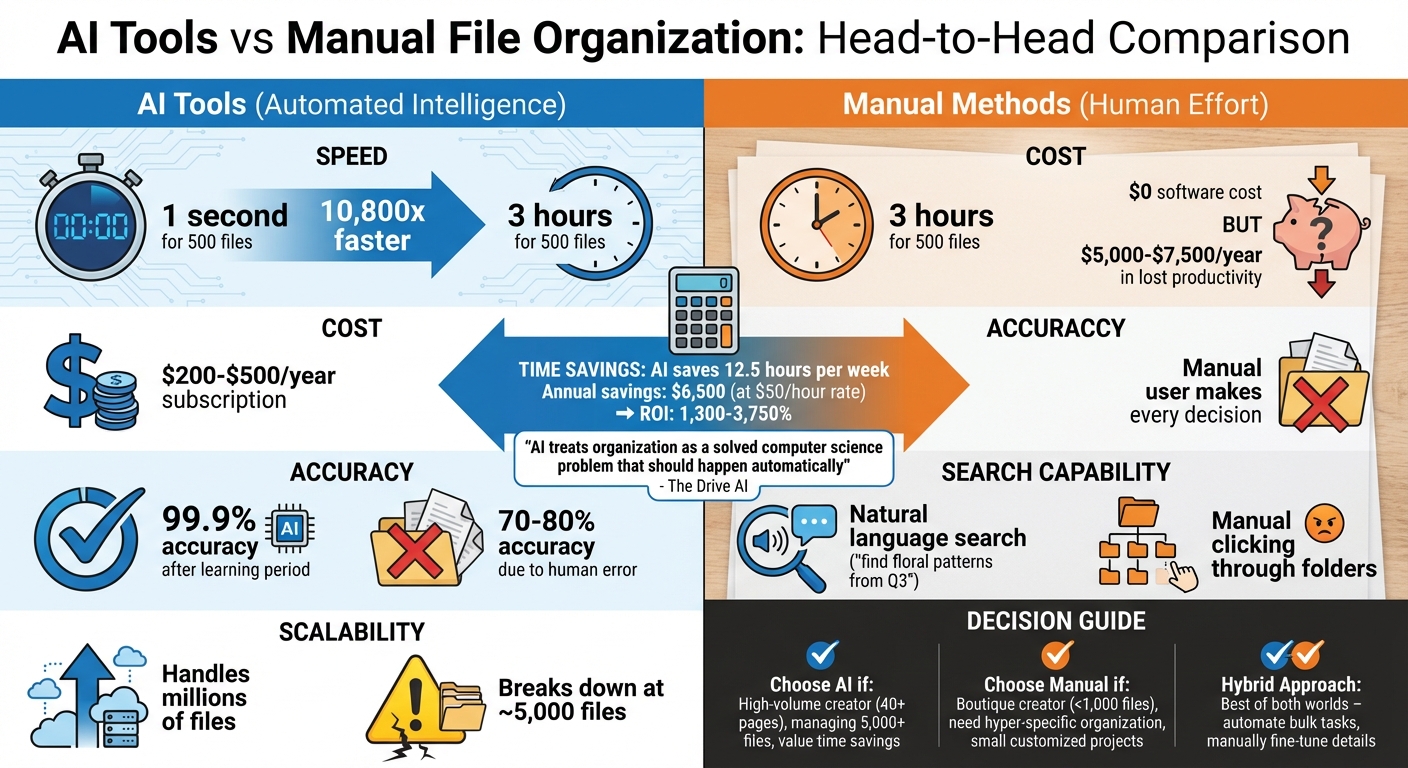
AI vs Manual File Organization: Speed, Cost, and Accuracy Comparison
Comparison Table: AI Tools vs Manual File Organization
When managing hundreds of coloring book pages, the contrast between AI tools and manual methods becomes striking. Here's a breakdown of how they compare:
| Feature | AI Tools | Manual File Organization |
|---|---|---|
| Cost | $200–$500/year subscription | $0 software cost; hidden productivity cost of ~$5,000–$7,500/year |
| Speed | 1 second for 500 files | ~3 hours for 500 files |
| Scalability | Handles millions of files | Breaks down at ~5,000 files |
| Accuracy | 99.9% (after learning period) | 70–80% (due to human error and fatigue) |
| Search | Natural language ("find floral patterns from Q3") | Manual clicking through folder trees |
| Control | High; AI suggests, user overrides | Total; user makes every decision |
This table highlights the major differences between AI-driven and manual organization. The speed gap is jaw-dropping - AI can sort files 10,800 times faster than manual methods. Accuracy is another game-changer: once trained, AI achieves 99.9% precision, while manual sorting struggles with human error, averaging 70–80% accuracy.
"Manual methods treat organization as a necessary human task... AI treats organization as a solved computer science problem that should happen automatically." - The Drive AI
Beyond speed and precision, these differences have a direct impact on costs. With AI saving approximately 12.5 hours per week, the annual savings can reach $6,500 based on a $50/hour rate. That’s an ROI ranging from 1,300% to 3,750%.
Which Approach Works for Different Creators?
Deciding between AI tools and manual methods depends on your production scale and workflow.
AI tools are ideal for high-volume creators. If you’re producing 40–60 pages in one go, juggling multiple client projects, or managing large image libraries, AI is the way to go. Automated file organization - like sorting KDP interior pages - eliminates the daily grind of repetitive decisions, saving you 30+ minutes a day and preserving your creative energy.
Manual methods suit boutique creators handling fewer than 1,000 files, especially when hyper-specific folder structures are essential to their workflow. If you’re working on small, highly customized projects and have the discipline to maintain order, manual organization can feel more intuitive.
For many professionals, a hybrid approach works best. Tools like Coloring Book Engine let you combine the speed of AI with the precision of manual adjustments. You can automate bulk sorting and generation, then fine-tune details like vector paths and line weights on your desktop. This is especially helpful when maintaining consistent 1–2pt line weights and 300 DPI resolution for professional-quality printing.
Ultimately, if you’re managing hundreds of files or regularly producing coloring books, the time savings alone make AI worth considering. But for smaller, tailored projects where full control is a priority, manual methods can still be effective - just be mindful of the hidden time costs.
Conclusion: Choosing the Right Approach for Your Workflow
When it comes to organizing your workflow, the best approach depends on what matters most to you. If you're managing high-volume projects, AI tools stand out for their speed and precision. On the other hand, for smaller, more personalized projects with specific folder setups, manual methods can still be effective - though they often struggle to keep up once the number of files surpasses 5,000.
Cost matters, but so does efficiency. While AI tools may require an annual investment of $200–$500, the hidden productivity cost of manual organization can climb to around $6,500 per year. This isn't just about how fast you can find files; it's also about the mental toll. On average, people make about 100 file-related decisions every day, which can sap the energy you'd rather spend on creative work.
Comparing AI vs traditional creation methods can help you find the best of both worlds. AI excels at tackling repetitive bulk tasks, while manual organization allows for precision. Tools like Coloring Book Engine strike this balance by letting you activate AI features only when necessary while keeping all processing local on your desktop. This means you can automate tasks like file sorting and bulk generation while still fine-tuning details like line weights and vector paths to meet professional standards for print. It’s a way to harness AI's efficiency without compromising on control or data privacy.
Here’s a quick test: if it takes you more than 30 seconds to find a file that's three months old, your workflow could use some fine-tuning. From there, you can decide whether adding AI for bulk tasks, sticking with manual methods for smaller projects, or blending both approaches makes the most sense for your workload and creative goals.
FAQs
How do AI tools protect sensitive files during organization?
AI tools tackle privacy concerns by prioritizing secure data handling practices. Many of today’s solutions operate directly on your device, ensuring that your files stay within your local environment. This setup keeps sensitive materials, such as unpublished artwork or client-specific designs, fully private and under your control. Features like bring-your-own-key (BYOK) take it a step further, enabling you to encrypt files and manage access. Additionally, optional local GPU processing not only boosts privacy but can also help reduce costs.
For creators, tools like Coloring Book Engine embrace these privacy-focused principles. They use AI to assist with tasks like organization, all without relying on external servers. By combining local processing with strong encryption, these tools allow you to enjoy the advantages of automation while keeping your data secure and protected from unauthorized access.
What are the costs of using AI tools compared to organizing files manually?
AI tools often come with upfront costs, like subscription fees or charges for local GPU processing. On the flip side, they can save a lot of time by automating repetitive tasks such as sorting, renaming, or tagging files. For creators who work on an hourly basis, this time-saving feature can directly translate into reduced labor costs.
On the other hand, organizing files manually eliminates software fees but can eat up a lot of time. Research indicates that professionals spend an average of 2.5 hours per week just searching for files - time that adds up in wage expenses over the long term. If you’re searching for a budget-friendly option without recurring cloud costs, Coloring Book Engine offers a BYOK (Bring Your Own Key) model with optional local processing. This approach gives you complete control over your expenses while ensuring your data stays private.
Can combining AI tools with manual methods improve file organization for coloring book projects?
Combining AI tools with manual methods can make file organization much more efficient. AI takes care of repetitive tasks like sorting files, applying consistent tags, and maintaining folder structures. This not only saves time but also minimizes errors. On the other hand, manual input allows for creative control, letting you fine-tune classifications and adjust to the specific needs of your project.
This mix of automation and human oversight creates a solid balance: AI handles the heavy lifting, while you focus on the finer details. The result? Less workload, fewer decisions to stress over, and a smoother, more dependable system - ideal for managing the intricate file systems common in coloring book production.