AI Coloring Pages: Batch Export for KDP
AI Coloring Pages: Batch Export for KDP
Creating AI-generated coloring books for Amazon KDP has become a fast and efficient way to publish and earn. Tools like batch export systems significantly reduce production time, allowing creators to generate high-quality, print-ready files in minutes. For example, Kalpesh Ghelani made $4,267 in three months by releasing 8–12 titles monthly using automation. Here's why batch exporting is a game-changer:
- Time-Saving: Generate 50 pages in 5–45 minutes instead of weeks.
- Consistency: Ensures uniform style and quality across all pages.
- KDP Compliance: Meets Amazon's strict standards like 300 DPI resolution, proper margins, and bleed settings.
The Coloring Book Engine is a standout tool, offering local processing, cost control with a BYOK model, and privacy by keeping data on your device. It's a one-time investment ($99 for individuals) that simplifies creating KDP-ready PDFs. Whether you're new or experienced, batch exporting helps you produce professional books faster and more efficiently.
What Is Batch Export and Why It Saves Time
Batch Export Defined
Batch export is a method for saving or creating multiple pages at the same time, either as a combined PDF or as individual image files. In the world of AI-generated coloring pages, this process is often called "Batch Mode" or "Bulk Generation." Essentially, it allows you to process a list of themed prompts in one go.
This eliminates the need to create pages one by one. By automating tasks like applying consistent style settings, aspect ratios, and formatting, batch export produces files that are ready for printing. The process involves entering your list of prompts, applying a uniform line-art style, and exporting high-resolution files that are perfect for assembling into a book.
For publishers using Kindle Direct Publishing (KDP), this approach makes production faster and more consistent.
Benefits for KDP Publishers
Automation through batch export drastically reduces the time spent on design work, freeing up publishers to focus on testing new ideas and refining their creative strategies. In fact, batch tools can cut design time by as much as 90%, allowing a 50-page book interior to be generated in just 5 minutes.
But speed isn’t the only advantage. Batch exporting ensures that every page in your book maintains the same level of quality and style. Whether it’s line thickness, contrast, or overall artistic consistency, all 25–50+ pages will look cohesive without the need for manual tweaks. Ben Robertson from ColorBliss highlights this efficiency:
The bulk generation feature... is a game-changer for creating comprehensive coloring books efficiently. This feature saves hours of clicking 'generate' repeatedly.
Another bonus? Instead of juggling dozens of individual image files, batch export combines everything into one print-ready PDF. This streamlined process allows you to test multiple book ideas quickly, helping you stay ahead in a highly competitive market.
Preparing Your AI Coloring Pages for Export
Organizing and Reviewing Files
Before you export your AI-generated coloring pages, it’s important to keep everything in order. Start by using a clear naming convention, ideally with leading zeros, to ensure your files stay in the correct sequence. For example, name them 01_lion.png, 02_tiger.png, 03_elephant.png, and so on. Without leading zeros, files like 10_elephant.png might appear right after 1_lion.png, throwing off the order. If you’re working on multiple projects, consider adding the book title to the filenames, such as OceanAnimals_001.png.
Take the time to review every page at 100% zoom. This helps you spot any stray pixels, broken lines, or AI-generated artifacts that need fixing before you proceed to batch processing. Organizing your files by theme can also make assembling your PDF much easier. Once your files are tidy and quality-checked, you’ll be ready to meet KDP's technical requirements.
KDP Technical Requirements
Having your files well-organized is key to meeting Amazon KDP's publishing standards. Start by ensuring your images are at least 300 DPI - anything lower will result in blurry prints. For an 8.5"×11" page size (a popular choice for coloring books), your images should measure about 2,550×3,300 pixels to meet the 300 DPI standard.
Export your pages as high-resolution PNGs before assembling them into a PDF. Make sure all lines are pure black (#000000) to prevent printing issues. Keep margins between 0.5" and 0.75" from the edges, and if your artwork extends to the edge of the page, include a 0.125" bleed. Remember, KDP has a maximum file size limit of 650MB for uploads, so plan accordingly.
How to Batch Export with Coloring Book Engine

Step-by-Step Batch Export Setup
Coloring Book Engine makes it simple to turn your artwork into KDP-ready PDFs. To get started, select the pages you want to export from the tabbed project workspace. Since the engine runs locally and uses your GPU, the process is quick and efficient.
Set your export preferences to a resolution of 300 DPI with an 8.5 x 11-inch layout. The batch workflow feature applies these settings to all selected pages simultaneously, so you don’t have to tweak each file one by one. For consistent line-art quality, you can integrate your API keys through the BYOK model or use local models powered by your GPU.
Once everything is configured, start the batch export. The engine will process all selected pages and save them as KDP-ready PDFs, following the naming convention you’ve chosen.
This streamlined process is why Coloring Book Engine is a great tool for KDP publishers.
Why Use Coloring Book Engine for Batch Export
One standout advantage of Coloring Book Engine is its predictable costs. With the BYOK model, you’re only charged per API call, so you avoid ongoing subscription fees. For those who prefer local processing, you can enjoy lifetime access at a fixed price.
Privacy is another major perk. Since all processing happens directly on your desktop, your artwork remains secure and never leaves your device. This local-first setup ensures full control over your data and output. For a one-time cost of $99 for individuals or $299 for teams, you gain lifetime access, keeping your production costs consistent and manageable.
sbb-itb-c02bfb4
Converting Exports to KDP-Ready PDFs
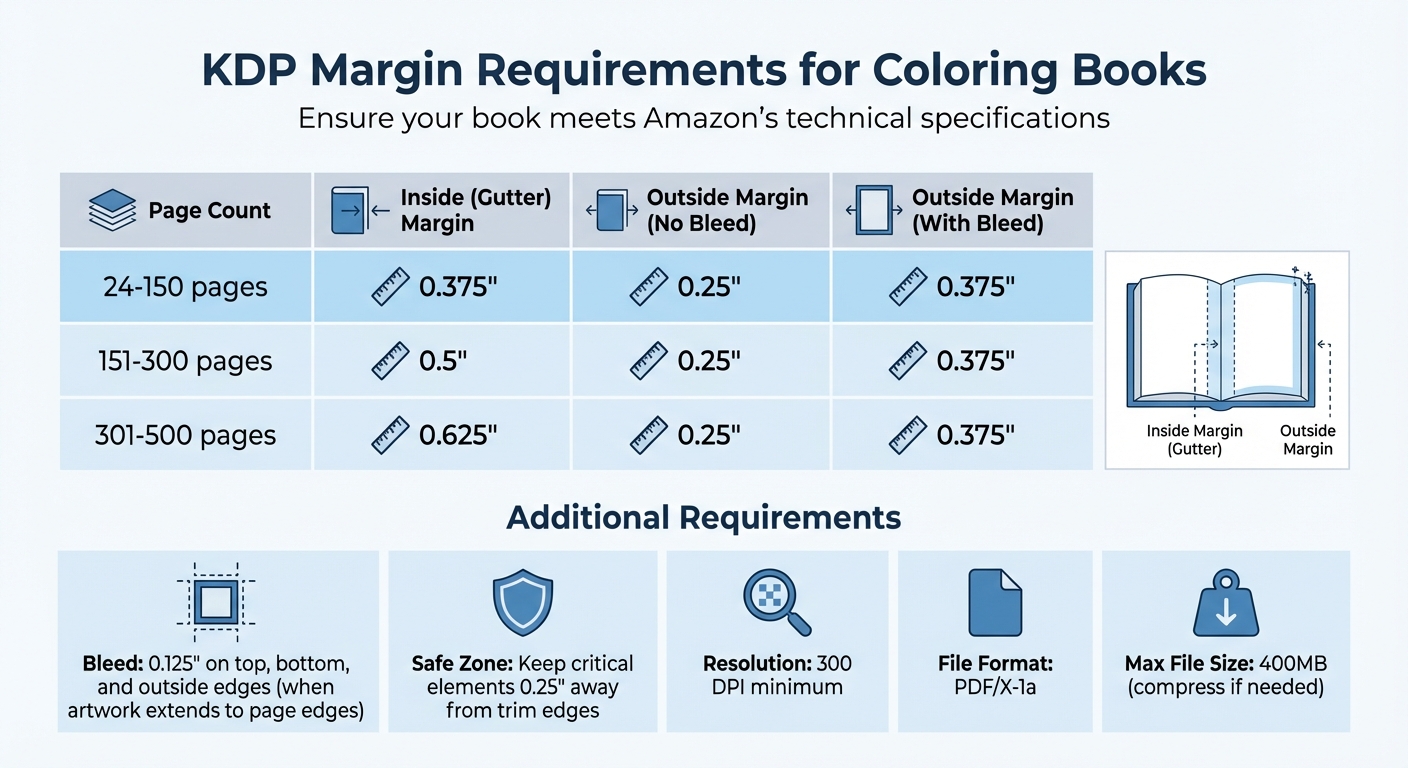
KDP Margin Requirements by Page Count for Coloring Books
Combining Pages into a PDF
Once you've batch exported your coloring pages from Coloring Book Engine, the next step is to combine them into a single PDF. If you're using Adobe Acrobat, the "Combine Files" tool makes this easy - just add, arrange, and merge your pages into one file. For those working with Adobe InDesign, set up an 8.5" x 11" document, place each image on its own page, and export the file as individual pages (not spreads) to align with KDP's formatting requirements.
If you prefer free tools like Google Slides, adjust the slide size to 8.5" x 11". Make sure your images are positioned on odd-numbered pages to accommodate single-sided printing.
Before moving forward, double-check your combined PDF to ensure everything looks right.
Quality Checks Before Submission
After assembling your PDF, it's time to review it against KDP's technical requirements. Verify that all images are at least 300 DPI. If any exceed 450 ppi, compress them to 300 ppi to keep the file size under 400MB.
Export the final file in PDF/X-1a format, as this is what KDP requires. This format minimizes potential printing issues and ensures consistent results. Be sure to exclude crop marks, registration marks, or color bars - these can disrupt KDP's automated trimming process.
Use the following margin guidelines to ensure your file meets KDP's requirements:
| Page Count | Inside (Gutter) Margin | Outside Margin (No Bleed) | Outside Margin (With Bleed) |
|---|---|---|---|
| 24 to 150 pages | 0.375" | 0.25" | 0.375" |
| 151 to 300 pages | 0.5" | 0.25" | 0.375" |
| 301 to 500 pages | 0.625" | 0.25" | 0.375" |
If your artwork extends to the page edges, include a 0.125" bleed on the top, bottom, and outside edges. Also, ensure critical elements stay at least 0.25" away from the trim edges to prevent them from being accidentally cut off during production.
Finally, upload your PDF to KDP and use their Print Previewer tool to check for any errors, such as incorrect margins or low-resolution images, before submitting your file.
Conclusion
Batch exporting transforms the way KDP coloring books are created. With this approach, you can produce a 50-page interior in less than five minutes, cutting down on time and eliminating the need for illustrator fees, which often start at $5 per page.
It’s not just about speed and cost-efficiency. Automated compliance ensures every page meets KDP's strict requirements, including 300 DPI resolution, 0.125" bleed, and proper margin settings. Plus, maintaining consistent styling throughout your book gives it a polished, professional appearance that helps earn buyer trust.
The Coloring Book Engine takes it a step further with its BYOK (Bring Your Own Key) model and local GPU processing. This setup gives you control over AI-related costs while safeguarding your data privacy. It efficiently handles batch processing, delivering KDP-ready files without the risk of unexpected expenses.
In today’s competitive KDP marketplace, having a streamlined batch export workflow means you can achieve speed, save money, and ensure quality - all key factors in creating standout coloring books.
FAQs
How does batch exporting help streamline the process of creating AI-generated coloring books for KDP?
Batch exporting is a game-changer when it comes to creating AI-generated coloring books for KDP. Instead of exporting pages one by one, you can process multiple pages at once, saving time and ensuring uniform settings across your project. Plus, it delivers a print-ready file that you can upload directly to KDP without extra hassle.
Here’s how it works: First, generate all your coloring pages using your AI tool of choice. Next, configure your export settings - like file format, resolution, and bleed - just once. These settings will then apply to all pages automatically. The software takes care of the rest, quickly exporting your content into either individual files or a combined PDF that aligns with KDP’s requirements. This approach not only cuts down on repetitive tasks but also guarantees consistent quality, making the production process faster and more efficient.
What are the technical requirements for creating AI-generated coloring pages for KDP?
To get your AI-generated coloring pages ready for KDP, it's important to follow these essential guidelines to ensure your files meet their requirements:
- File format: Export your interior as a print-ready PDF with embedded fonts. While individual pages can be PNG or JPG, KDP only accepts PDFs for the final upload.
- Resolution: Use 300 dpi for all images to ensure sharp and high-quality prints.
- Trim size and bleed: Select a KDP-approved trim size, such as 8.5 × 11 inches, and add a 0.125-inch bleed to all sides. For instance, an 8.5 × 11-inch book would require document dimensions of 8.75 × 11.25 inches.
- Margins: Keep all essential artwork at least 0.25 inches inside the trim line to avoid accidental cropping.
- Single-sided vs. double-sided: Decide upfront whether your pages will be single-sided (a popular choice for coloring books to prevent bleed-through) or double-sided.
- Artwork checks: Review your files for consistent line weight, remove stray marks, ensure the correct page count, and flatten the PDF to eliminate editable layers before uploading.
Pro Tip: Tools like Coloring Book Engine can streamline the process by applying KDP’s trim, bleed, resolution, and PDF settings automatically, saving you time and ensuring everything is compliant.
Why is Coloring Book Engine ideal for batch exporting coloring pages for KDP?
Coloring Book Engine stands out as a top choice for batch exporting coloring pages for KDP thanks to its combination of speed, quality, and simplicity. This tool makes it easy to generate and export print-ready files that align perfectly with KDP's publishing requirements.
With its one-click export feature, you can create a single PDF complete with proper margins, bleed, and trim settings - no manual tweaks needed. It also ensures consistent, clean line-art across all pages, cutting down on editing time. By streamlining the entire process, this tool allows you to produce professional-quality coloring books more efficiently, making it a fantastic option for KDP publishing.
Related documentation
- Run pages through the coloring process guide before batch export.
- Export the finished book with the KDP-compliant interior PDF export guide.